What is Access Packages?
Access packages are a powerful feature of Microsoft Entra ID that can help organizations manage identity and access lifecycle at scale.
Access packages must be in a container called a catalog, which defines what resources you can add to your access package. If you don’t specify a catalog, your access package goes in the general catalog. Currently, you can’t move an existing access package to a different catalog.
All access packages must have at least one policy for users to be assigned to them. Policies specify who can request the access package, along with approval and lifecycle settings. When you create an access package, you can create an initial policy for users in your directory, for users not in your directory, or for administrator direct assignments only. Or, you can choose to create the policy later.
Why should you use access packages?
Here are some reasons why you should use access packages in Azure:
- Efficiently manage access to resources: Access packages allow you to bundle resources such as groups, applications, and SharePoint Online sites into a single package that can be requested by users. This makes it easier to manage access to these resources, as you can set up policies and approvals for the entire package rather than managing access to each resource individually.
- Automate access request workflows: With access packages, you can automate the process of requesting, approving, and granting access to resources. This can save time and reduce the risk of human error when managing access to resources.
- Control access with time-limited assignments and recurring access reviews: Access packages allow you to set time limits on assignments and schedule recurring access reviews to ensure that users don’t retain access indefinitely. This can help prevent users from holding onto access longer than is required for business purposes.
Not using access packages in Azure can expose your organization to several risks, including:
- Difficulty managing employee access to resources: Without access packages, it can be challenging for users to know what access they should have and for administrators to manage access to multiple resources individually.
- Users retaining access longer than necessary: Without time-limited assignments and recurring access reviews, users may hold onto access longer than is required for business purposes.
- Inconsistent management of external user access: Without a centralized way to manage external user access, it can be difficult to ensure that all external users have the appropriate level of access and that their access is managed consistently.
In conclusion, using access packages in Azure can help organizations efficiently manage identity and access lifecycle at scale by automating workflows, controlling access with time-limited assignments and recurring reviews, and reducing the risk of human error when managing employee and external user access.
Access packages and Azure Landing Zones
For large enterprises, access packages can enhance security, reduce onboarding costs, and simplify resource management. As someone who primarily works with Azure and Azure Landing Zones, I have developed a proposal for implementing access packages on a large scale for enterprises that utilize the Azure Landing Zone reference architecture. If you are not familiar with the Azure Landing Zone reference architecture, you can find more information here. Additionally, I have written a blog post that offers tips and tricks for implementing Azure Landing Zones with Terraform.
In my work with Azure and Azure Landing Zones, I have primarily focused on managing access to Azure resources by creating a few access packages for the Microsoft Entra ID. My goal is to create an easy approach for granting access to the right people, with different approval steps depending on the level of access they require.
Access Package structure for Azure Landing Zone
Based on my experience with the different responsibilities within the Azure Landing Zone architecture, I have divided access into three parts: Microsoft Entra ID, Platform Team/Central IT, and Developer. These three groups require different levels of access based on their responsibilities. To reflect this, I have created three catalogs: Microsoft Entra ID, Platform, and Landing Zone. These catalogs represent the scope of the Azure Landing Zone reference architecture and should be easy to implement and keep up to date.
The idea behind the different groups is that, in my experience, there is often a specific team or group of people responsible for managing Microsoft Entra ID. As such, they should be placed in their own category. When it comes to the platform part of Azure Landing Zones (ALZ), I have seen a variety of solutions. However, in large enterprises, there are often different teams responsible for different parts of the platform. Therefore, it makes sense to have different Entra ID groups for each of them. Of course, if the use case requires it, there is no problem in creating a group that is a member of all the subscriptions.
Within these catalogs, the though is to create several different access packages with varying policies and workflows. For example, in the Microsoft Entra ID catalog, you can create access packages for Global Admin and Directory Reader. In the Platform catalog there could be access packages for Owner, Contributor, and Reader for the platform management group and each of the subscriptions: Platform, Identity, Management, and Connectivity. This is illustrated in the picture below.
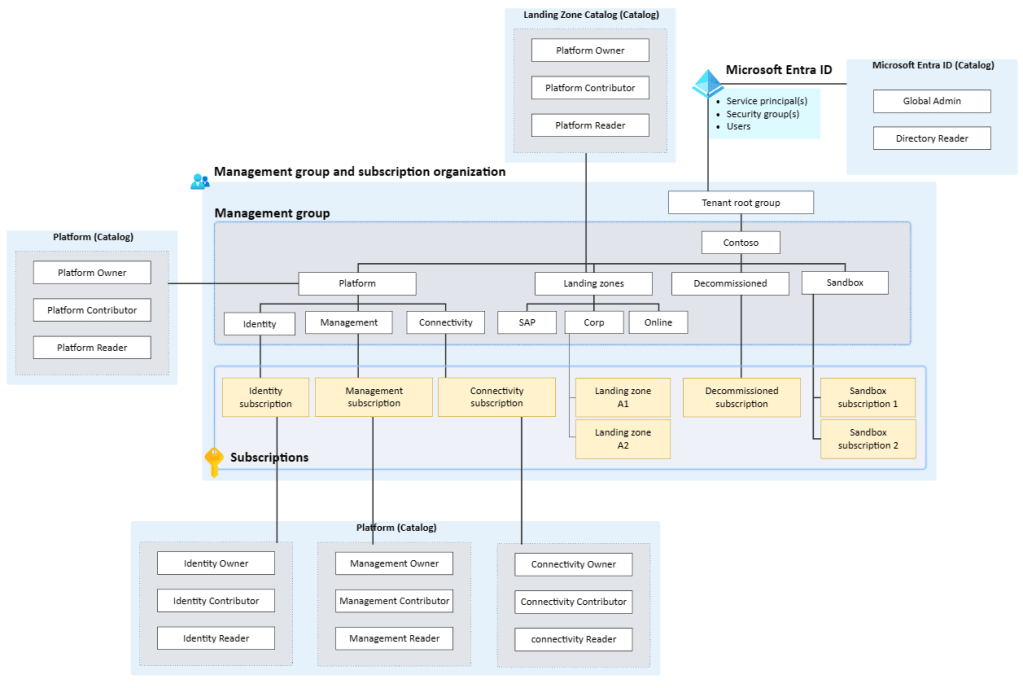
There is one thing that is missing and that is «who is going to grant the access?». This should also be controlled by an Entra ID group, where the members can grant access to the different access packages. You can also create more then one group if there is different people that should grant access for different catalogs or policies. The flow will then look like this:

To facilitate this process, I have created an example using a module that creates Entra ID groups connected to these access packages. The example contains two catalogs with associated access packages for the connectivity subscription and the landing zone management group. To implement this for the rest of the azure landing zone architecture it is simple to just expand the example. You can find the example here.
Example
You can find the code for the example here. It will implement two catalogs, platform and landing-zone. In addition to this there will be access packages for the connectivity subscription. See the pictures below for how it will look for the user when implemented. This is the view when visiting https://myaccess.microsoft.com/.

The user will request access and need to specify why they need access. After they have applied the members of the Entra ID Group that have the approval permission for the access packages receive an email where they can approve the request or not.
For the administrator of the catalogs it will look like this:


Summary
Access packages are a feature of Microsoft Entra ID that can help organizations manage identity and access lifecycle at scale. They must be in a catalog, which defines the resources that can be added to the access package. Access packages must have at least one policy for users to be assigned to them, specifying who can request the package and its approval and lifecycle settings. Using access packages in Azure can help organizations efficiently manage access to resources, automate access request workflows, and control access with time-limited assignments and recurring access reviews. Not using access packages can expose organizations to risks such as difficulty managing employee access to resources, users retaining access longer than necessary, and inconsistent management of external user access.
The proposal for the access package’s structure is focused on managing access to Azure resources by creating access packages for Microsoft Entra ID, with the goal of granting access to the right people with different approval steps depending on their level of access. I have divided access into three parts: Microsoft Entra ID, Platform Team/Central IT, and Developer, and created three catalogs: Microsoft Entra ID, Platform, and Landing Zone. Within these catalogs, I have created several different access packages with varying policies and workflows. The Reader and Contributor roles serve as self-access reminders, while the Owner permission requires elevation through PIM and an approval step every 3 months. I have also created a module that creates Entra ID groups connected to some of these access packages and enables PIM for Entra ID groups with high permissions.

 Håvard Løkensgard
Legg igjen en kommentar