This past week, a lot of crucial updates were released for Azure DevOps, aimed at enhancing security. In this blog post, we’ll explore how these new features can be implemented to improve the security in your Azure DevOps project. This will be a concise guide, demonstrating how you can quickly and efficiently implement these security measures. In just three steps, we’ll cover the implementation of the following security capabilities:
- Secret Scanning push protection
- Secret Scanning repo scanning
- Dependency Scanning
- Code Scanning
- Increased security for ARM service connection (NO more secrets!)
GitHub Advanced Security Azure DevOps
GitHub has long offered advanced security features, and these have now been extended to Azure DevOps. You can read more about the release here and the official documentation from Microsoft here.
Implement GitHub Advanced Security in 2 steps
Step 1: Turn on the Advanced security feature under project settings -> Repositories. You can also turn this on for the entire project or the entire organization. See more about this here.

Step 2: Update the pipeline with the following code
# Dependency Scanning
# Add this to your pipeline
- task: AdvancedSecurity-Dependency-Scanning@1

# Code Scanning
# Add this to your pipeline
- task: AdvancedSecurity-Codeql-Init@1
  input:
    # Add the language you want to scan
    # The supported lanaguages are: csharp, cpp, go, java, javascript, python, ruby
    language: 'javascript'

# This is language dependent
- task: AdvancedSecurity-Codeql-Autobuild@1

# Perform the analysis
- task: AdvancedSecurity-Codeql-Analyze@1
Congratulations! You have now implemented:
- Secret Scanning push protection
- Secret Scanning repo scanning
- Dependency Scanning
- Code Scanning
Billing
From the billing information: Advanced Security is billed based on the number of unique active committers across all enabled repositories in your subscription.
Advanced Security is billed based on the number of unique active committers across all enabled repositories in your subscription. For example, if you have a team of five people actively committing code (i.e., you have committed code to at least one repository within the last 90 days), with a cost of $49 for each license, you would pay $250 (rounded up) for that team. This only affects the repositories that have Advanced Security enabled. While this can quickly become expensive, it also provides a host of enhanced security features. As always, it’s a question of cost versus reward.
Improved service connection to Azure
A new and improved method for using service connections from Azure DevOps to Azure. For the release notes see here and for the official Microsoft documentation see here.

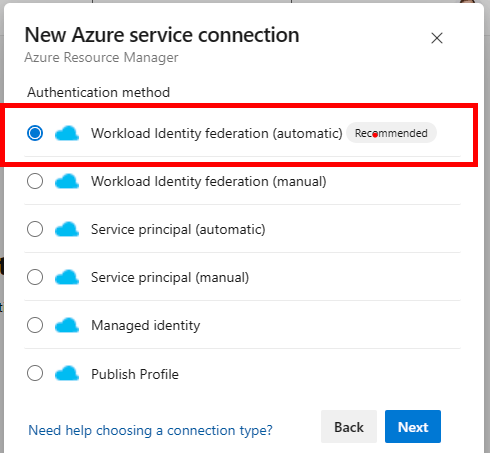
Previously, you needed to use a service principal with a client ID and a client secret. This could lead to the secret being leaked or exfiltrated, compromising the trust between Azure DevOps and Azure. With the new Workload Identity Federation, there is no secret involved in the communication between Azure Pipelines and Azure. As a result, tasks running in pipeline jobs cannot leak or exfiltrate secrets that have access to your production environments.
Summary
If you have followed these steps you have massively increased the security for you Azure DevOps repositories in only 3 small steps. With the following capabilities:
- Secret Scanning push protection
- Secret Scanning repo scanning
- Dependency Scanning
- Code Scanning
- Increased security for ARM service connection (NO more secrets!)
 Håvard Løkensgard
Legg igjen en kommentar