Are you intrigued by Azure Virtual WAN? If so, continue reading. I’ve been working with this technology for several months and I’m eager to share my firsthand experiences from multiple implementations. However, before you delve deeper, please note that this article will not delve into the intricate details of how routing works internally within Azure Virtual WAN. Instead, it will focus on my personal experiences and highlight key considerations you should keep in mind before implementing it yourself. It’s important to remember that this technology is rapidly evolving, and the information provided here could become outdated even before it’s published. So, bear this in mind as you read on.
What does it solve?
What does it solve? The main thing that Azure Virtual Wan helps you with is routing. Both in a positive and negative manor. The positive side is that you don’t need to worry about user define routes or any other routing problems. The bad things is that you can’t override the routing since it is managed by the Azure. This problems increases when introducing BGP, since you can’t have any control over it. So if you need complete control over the routing in your network, azure virtual wan is not for you. I will also strongly recommend using it only if you actually need multiple locations with multiple branches, other then that, just stick to standard hub-spoke. With the new Azure Virtual Network Manager (VNM) you can solve a lot of the problems that virtual wan does without giving up control.
What do you need to think about? One of the first things that i experienced is that the virtual network for the hub is now managed. This means that I can’t do anything with it, it is just there. So, if I need a subnet for something in the hub, forget it. That resource or service goes into a spoke network and then peered back to the hub.
DNS
Since the virtual network is managed you need to have a separate network for handling DNS. I recommend using the new private DNS resolver. I have tested it out earlier and you can find my previous blog here. The design for the DNS should look like this (based on the Azure Landing Zone architecture).
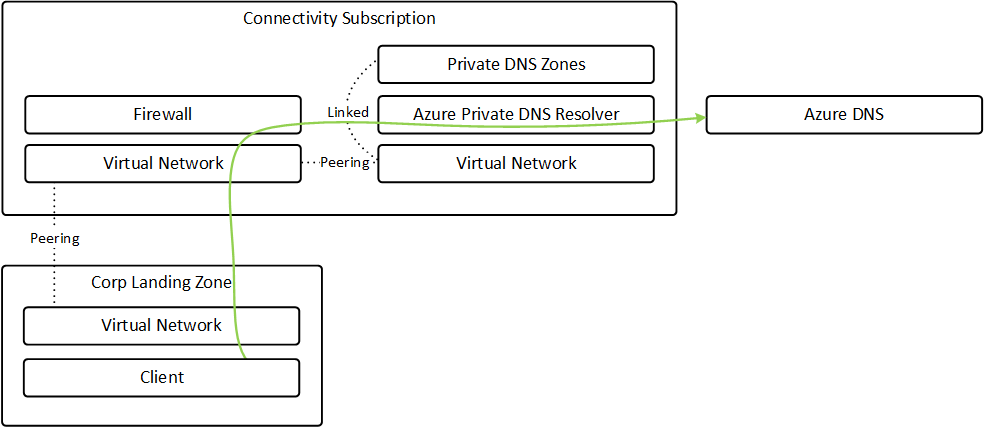
Secure Hub – adding a firewall into the mix
The new firewall manager lets you manage all the firewall through one view. A great place to get an overview over the entire architecture. But it is really important to enable certain settings when using firewall manager with virtual wan.
They ensure that the internet traffic and internal traffic is routed through the firewall. And be very observant that the internet traffic can be overridden even though you set it as the policy. This is because not every resource or service should have the default 0.0.0.0/0 route on the routing table through the firewall. Some examples are VPN gateway subnet and Bastion subnet. But this means that you also can create virtual hub connection without the internet traffic being routed through the firewall as a mistake. If you are using code to set it up, the default value for the routing intent policy is false, so if you don’t take a active chose to set it to true you can end up having a lot of traffic going outside of the firewall.
# When peering to virtual wan you need to use the hub connection
resource "azurerm_virtual_hub_connection" "vnet_to_hub" {
  name                      = "somevnet_to_hub"
  virtual_hub_id            = hub_vnet_id
  remote_virtual_network_id = this_vnet_id
  internet_security_enabled = true # This ensures that network traffic to internet is routed through the virtual hubs firewall
}
Bastion – not supported through the firewall – but why?
When I implemented this supported for routing the traffic with UDR for the bastion was not supported. That meant that you had to ensure that every network was peered to the virtual network that the Bastion was deployed to. In a traditional hub-spoke topology this was not a problem, since you could just deploy the Bastion client in the hub and it worked fine. However, with the virtual wan you can’t do that. You need a dedicated virtual network, not a problem. The problem starts when you can’t use UDR… So you can’t rely on the peering to the virtual wan hub, you need to peer it to every virtual network. This is tedious, we automated it with a IaC and some PowerShell code that updated the peering for every virtual network that should have bastion connection.
BGP – a list of not supported or workaround elements
Using BGP with azure virtual wan can be a troublesome experience, and the information and experience I have are probably out dated already. Here are some features that we experiences was not supported:
- Static Routes in virtual Hubs must be configured in every virtual Hub.
- BGP route-maps are in preview (we experienced some issues with this and preview features should not be deployed in production)
- Custom route tables are not supported
Breaking habits
When you go from working with traditional hub-spoke topology to virtual wan in Azure and you are using IaC to deploy everything, prepare to just change up everything. Almost all the resources have different names, api and parameters. Not a huge problem, just a bit more work to set it up since you need to learn everything again.
Conclusion
Working with technology that is in development can be tricky and frustrating. Working with technology that is the foundation of your infrastructure, such as the network is critical. After playing around and deploying virtual wan in multiple production scenarios I have concluded with: Do you need Virtual WAN? Are you sure you need it? If yes, you take the risk of using technology that is in rapid development and will probably not support every use-case you have. During the last year a lot of functionality that I wanted have been released, such as the routing intent, but there is still a lot left. So, remember to check out the FAQ for the virtual wan and verify that you need it before taking that decision.
 Håvard Løkensgard
Legg igjen en kommentar