Introduction
Since I’m one of those that is «born in the cloud» I have not been working very much with DNS until now. DNS has always been a black box, but now with the new Azure DNS Revolver I though is was about time to take a deep dive into this and see how this fits into the new Azure Landing Zone architecture.
DNS is an essential component of any cloud-based solution, but it can also be a complex and challenging one. For those who are not familiar with DNS, it is a system that translates domain names into IP addresses, allowing devices to communicate over the internet. However, DNS can also involve different scenarios and configurations, such as custom DNS services, private DNS zones, and DNS forwarding. In this blog post, I will explore how the new Azure DNS Resolver can simplify and enhance the DNS experience in Azure. The new Azure DNS Resolver is a fully managed service that provides inbound and outbound DNS resolution capabilities for Azure virtual networks. It also enables the use of infrastructure as code (IaC) for managing the different elements of DNS, which I will demonstrate later.
What does it solve?
Before diving into the details of the Azure DNS Resolver, let’s first understand what kind of problems it can solve. Here are some common scenarios that involve DNS challenges in Azure:
- You have an on-prem custom DNS that wants to resolve records in Azure. This could be solved by using a VM based DNS forwarder in Azure. Not optimal, but it works.
- You want to resolve DNS records from azure that are located on-prem. This was not possible before, as there was no way to forward DNS queries from Azure to an on-premises DNS server.
- You want to have more control and visibility over the DNS configuration and behavior in your Azure environment. This was difficult to achieve with the existing DNS options, as they were either limited or not fully integrated with Azure.
In addition to this is enables the use of IaC for the forwarding rules and all the benefits of IaC.
Architecture
I used the Azure Landing Zone Contoso referanse architecture as a starting point and implemented the Azure Private DNS Resolver in the connectivity subscription. It needs two subnets, an inbound and outbound, these are deployed into the hub virtual network. In addition to this I set up a storage account with a private endpoint in a spoke with the DNS record located in a private DNS Zone in the connectivity subscription. I used a VM to look up the DNS to verify the firewall logged everything.
The spoke virtual network is set up with a custom DNS pointing to the firewall’s private IP address. The firewall have enabled the reverse proxy DNS functionality and it points to the private inbound endpoint in the Azure private DNS resolver. A complete overview can be seen in the picture below.
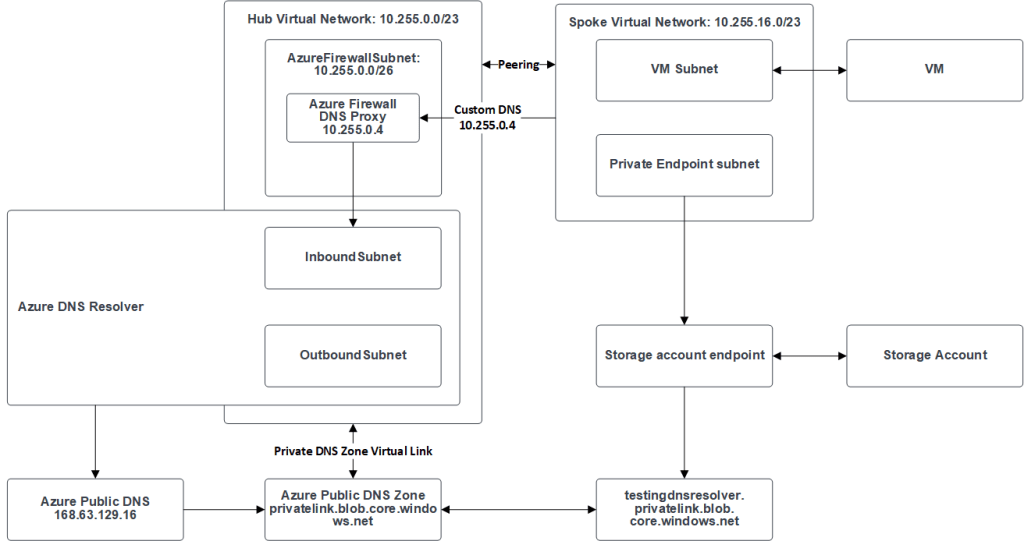
Inbound subnet
The Azure DNS resolver needs an inbound subnet (recommended is a /24 subnet). In the subnet the private DNS resolver have an private endpoint. It can have multiple privat endpoint, but each of them needs to have their own subnet. Using multiple private endpoints can be very useful if you have multiple business unit that needs to talk to different DNS records and they should not know about the other DNS records.
This solves the problem with a custom DNS on-prem resolving records in Azure. You don’t need a DNS forwarding in Azure, since you can route the traffic to the inbound endpoint. This is also the case for resources in other virtual networks in Azure.
Outbound subnet
Used for the outbound endpoint for the DNS resolver. The outbound endpoint is responsible for forwarding and resolving DNS queries from sources within Azure for other customer DNS services, such as on-prem.
The outbound endpoint is depended on a set of forwarding rules. These ruleset are bound to the outbound endpoint and will ensure that the private DNS resolver can ask Azure DNS about DNS records that are located in a custom DNS.
The outbound endpoint solves the problem of resolving records on-premises from resources in Azure. You can now forward your queries from Azure to your on-premises or third-party custom DNS servers without any hassle.
Code
I deployed the Azure DNS resolver into an existing Azure Landing Zone infrastructure. The only resources I needed to change were the custom DNS on the virtual network and the Azure Firewall DNS Proxy. Setting the custom DNS on the virtual network could be solved by using an azure policy if wanting to ensure compliance for every landing zone.
The code deploys the Azure DNS resolver with the two subnets into the hub virtual network. For more information about the code see the git repo.
# Creating the resource group for the private dns resolver
resource "azurerm_resource_group" "private_dns_resolver" {
  name     = "private-dns-resolver-rg"
  location = var.location
}

# Creating the private dns resolver
resource "azurerm_private_dns_resolver" "hub_network" {
  name                = "private-dns-resolver-hub"
  resource_group_name = azurerm_resource_group.private_dns_resolver.name
  location            = azurerm_resource_group.private_dns_resolver.location
  virtual_network_id  = data.azurerm_virtual_network.hub.id
}

# Creating the inbound subnet for the private dns resolver
resource "azurerm_subnet" "private_dns_resolver_inbound" {
  name                 = "private-dns-resolver-inbound"
  resource_group_name  = data.azurerm_virtual_network.hub.resource_group_name
  virtual_network_name = data.azurerm_virtual_network.hub.name
  address_prefixes     = var.private_dns_resolver_inbound_address_prefixes

  # Creating the delegation for the inbound subnet
  delegation {
    name = "Microsoft.Network.dnsResolvers"
    service_delegation {
      actions = ["Microsoft.Network/virtualNetworks/subnets/join/action"]
      name    = "Microsoft.Network/dnsResolvers"
    }
  }
}

# Creating the outbound subnet for the private dns resolver
resource "azurerm_subnet" "private_dns_resolver_outbound" {
  name                 = "private-dns-resolver-outbound"
  resource_group_name  = data.azurerm_virtual_network.hub.resource_group_name
  virtual_network_name = data.azurerm_virtual_network.hub.name
  address_prefixes     = var.private_dns_resolver_outbound_address_prefixes

  # Creating the delegation for the outbound subnet
  delegation {
    name = "Microsoft.Network.dnsResolvers"
    service_delegation {
      actions = ["Microsoft.Network/virtualNetworks/subnets/join/action"]
      name    = "Microsoft.Network/dnsResolvers"
    }
  }
}

# Creating the private inbound endpoint for the private dns resolver
resource "azurerm_private_dns_resolver_inbound_endpoint" "hub_network" {
  name                    = "inbound-endpoint"
  private_dns_resolver_id = azurerm_private_dns_resolver.hub_network.id
  location                = azurerm_private_dns_resolver.hub_network.location
  ip_configurations {
    private_ip_allocation_method = "Dynamic"
    subnet_id                    = azurerm_subnet.private_dns_resolver_inbound.id
  }
}

# Creating the private outbound endpoint for the private dns resolver
resource "azurerm_private_dns_resolver_outbound_endpoint" "hub_network" {
  name                    = "outbound-endpoint"
  private_dns_resolver_id = azurerm_private_dns_resolver.hub_network.id
  location                = azurerm_private_dns_resolver.hub_network.location
  subnet_id               = azurerm_subnet.private_dns_resolver_outbound.id
}
Result
After the deployment I logged into the virtual machine and run a DNS lookup.
Resolve-DnsName -Name "testingdnsresolver.privatelink.blob.core.windows.net."
The theory was that I could get the IP back and find the logs for the DNS lookup in the Azure Firewall.

The DNS lookup worked as expected and I could also find the logs in the azure firewall.

I currently don’t have any on-prem solution for my lab right now. So testing the outbound forwarding functionality will be some other time.
Summary
The new Azure DNS resolver can simplify the use of custom DNS in Azure. It enabled the use of IaC and also offers some new functionality that until now was not possible with the forwarding from Azure to on-prem. The introduction of inbound and outbound endpoints ensures that working with DNS is much easier than before. You no longer need VM based DNS services.
I’m looking forward to working more with this in the future and recommend giving it a try and see how it can help you with your DNS needs in Azure.

 Håvard Løkensgard
Legg igjen et svar til Azure Virtual WAN: Personal Experiences and Key Considerations – Håvard Løkensgard Avbryt svar