Changing your network infrastructure can often feel like a daunting and cumbersome task. However, with the new Azure Virtual Network Manager this can be done in a much easier way. This blog will look into how it is to use AVNM, what are the consequences and feel of this new tool.
Operational processes overview
| Operational process | Solution |
| Configure network topology | Create a connectivity configuration. |
| Change hub | Change connectivity configuration. |
| Ensure network consistency | Add virtual networks to different networks group. |
| Add security rules | Create or update a security admin rule configuration. |
| Deny communication between networks | Create deny configurations in a security admin rule. |
| Enforce traffic (deny or allow) | Create security admin rule configuration. |
| Enforce default network flow | Create UDR configuration. |
Changing connectivity configuration with a click
I recently explored how straightforward it is to set ut up a new topology with a large set of virtual networks. Either a hub-spoke or a mesh topology. Using the connectivity configuration this was straight forward. With 100 virtual networks, each added to the same network group, the process was surprisingly simple. Configure -> Deploy -> Coffee

Then I wanted to change out the hub with another hub. To change the hub, navigate to the connectivity configuration, select the existing hub, and replace it with the new one. The entire process, including removing and redeploying peerings, took about 15-20 minutes and required just a few clicks. It was an intuitive and efficient experience. Important: this example is just to show hos easy it can be. If you have a firewall, VPN or other central components. Be very careful with doing this.

Security Admin rules – where to find configuration
When deploying security admin rules from a central IT perspective, you can enforce rules on virtual networks without the network owners being able to override them. These rules can be viewed in two places: under the network manager pane in the virtual network settings and on the NIC (Network Interface Card) for a virtual machine under effective routes. Remember that the security admin rules are evaluated before the network security group.

The other view is on the NIC for a virtual machine. Under effect routes:


UDR Management
How does this configuration works? Deploying a new UDR configuration should ensure that the configuration is deployed to all virtual networks in the network group. But for UDR to work you need a routing table and associate it with subnets.
After deploying the UDR configuration and if there are any subnets in the network group it will create a resource group with the name <Azure Virtual Network Manager name><Managed_ResourceGroup_><SubscriptionID>.
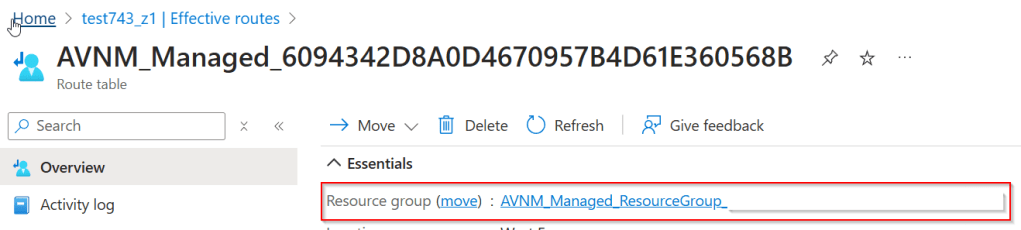
In this resource group, a routing table will be created and associated with all the subnets in the network group. For example, you can observe the effective routes on the NIC before and after the UDR configuration was deployed. The default route is added, and the associated route table is now managed by AVNM.


Important to know: If you deploy UDR it will create a custom routing table and override the existing one for the subnets. So every custom route will be gone. It will remove the old one and replace it with the AVNM managed.
Policy
You can find new policies that ensure virtual networks are added to the network group, using a new effect type called AddToNetworkGroup. In total, there are four policies available for adding virtual networks to network groups.

However, it seems that we can’t use it for remediations tasks because it doesn’t find any resources. There might be some behind-the-scenes magic that resolves these issues for us in this case.

Summary
In conclusion, Azure Virtual Network Manager (AVNM) significantly simplifies the process of changing your network infrastructure. From configuring network topologies and changing hubs to managing security rules and UDR configurations, AVNM provides a streamlined and efficient approach. While there are some nuances to be aware of, such as the impact on existing routing tables and the limitations of certain policies, AVNM’s capabilities make network management more accessible and less cumbersome.
 Håvard Løkensgard
Legg igjen en kommentar